





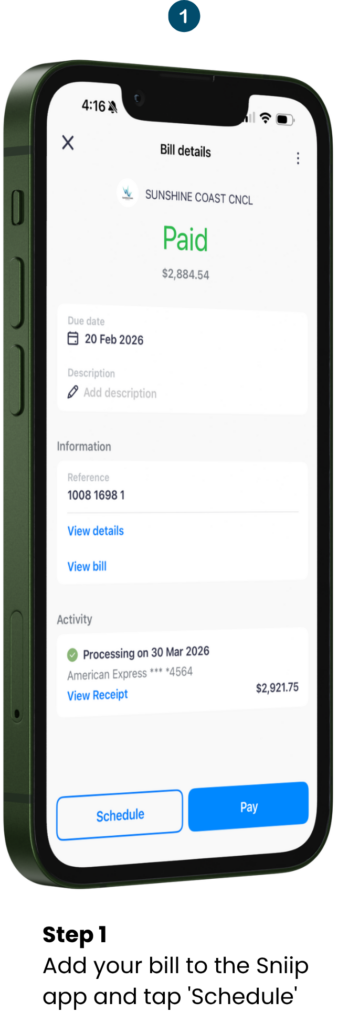
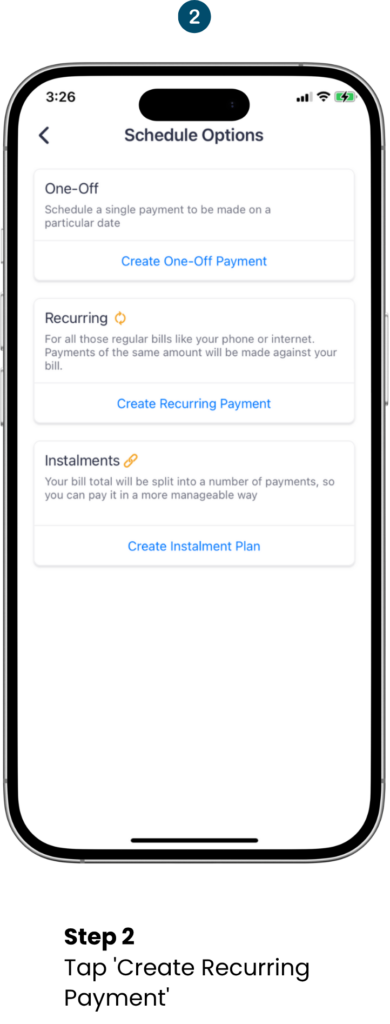
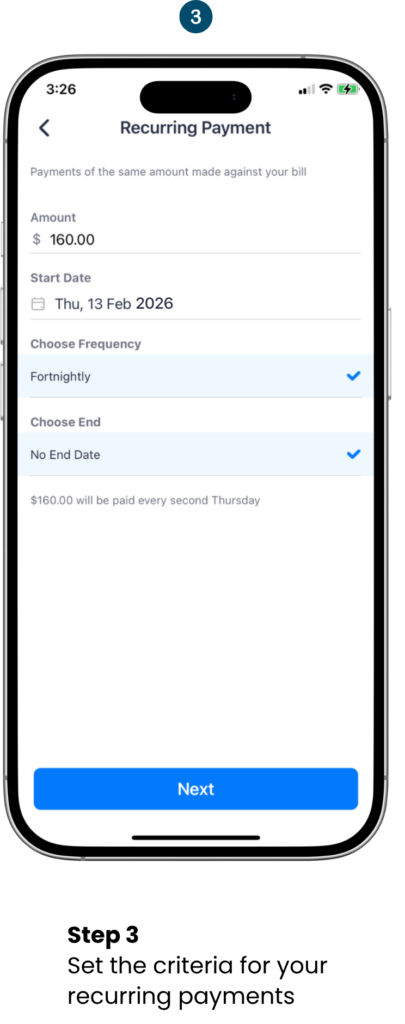
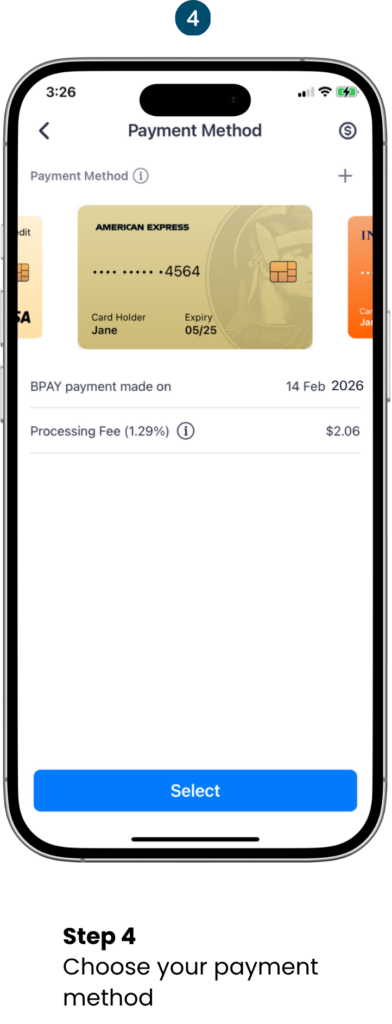
Pay Sunshine Coast Council Rates With Sniip

No QR? No problem. Pay via BPAY in seconds.

New to Sniip? Enter your mobile number and we’ll text you a link to download the app!

alt=(Pay Sunshine Coast Council Rates With Sniip)

Pay Sunshine Coast Council With Sniip

Sunshine Coast Council Rates

Since 2016, Sniip has been the trusted, #1 way for Australians to pay their council rates and bills – including Sunshine Coast Council rates. Pay with any payment method, including American Express, and earn full credit card points on every single payment. No cash advance. No points forfeiture.

Ready to Pay Sunshine Coast Council Bill?

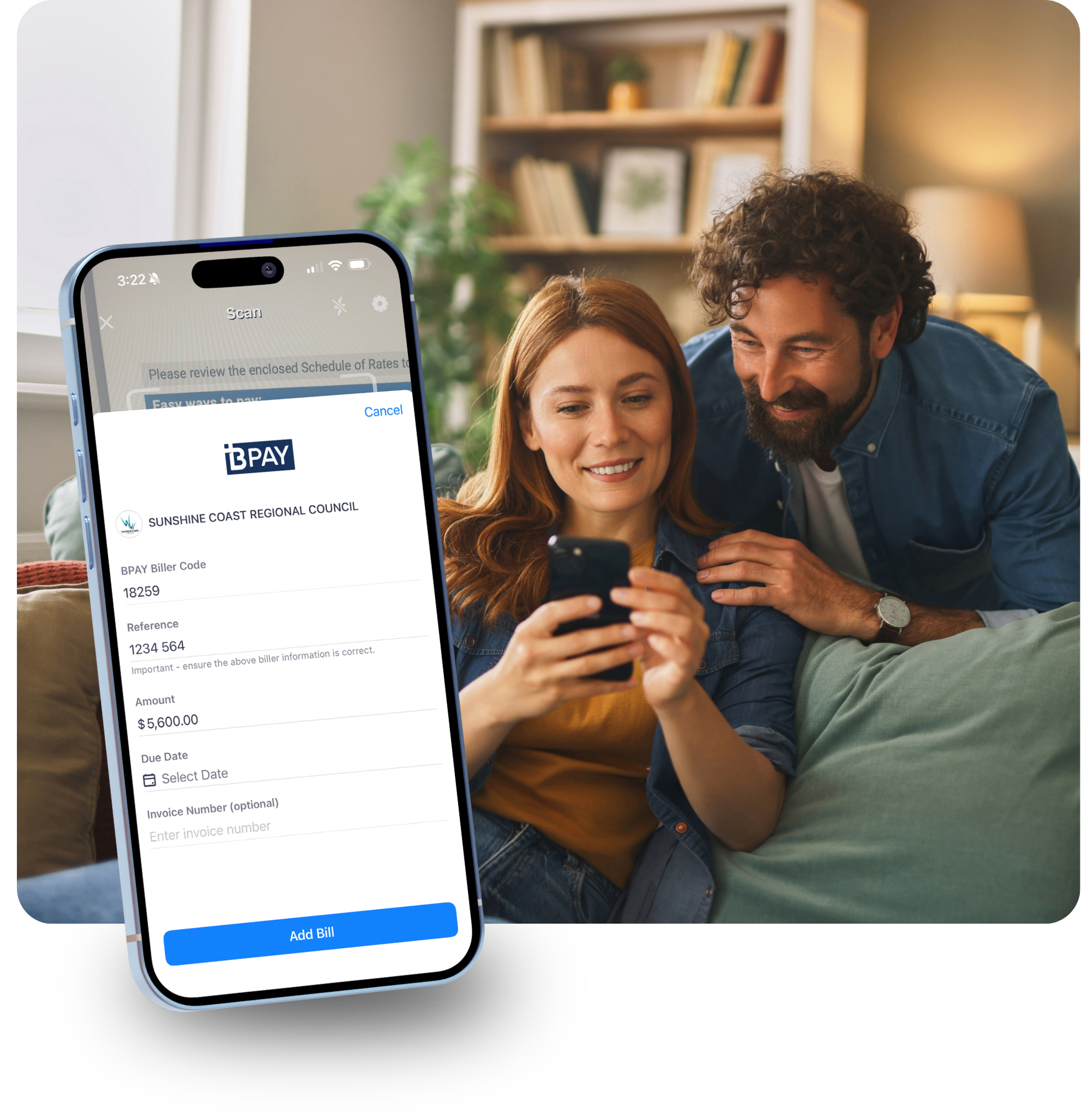
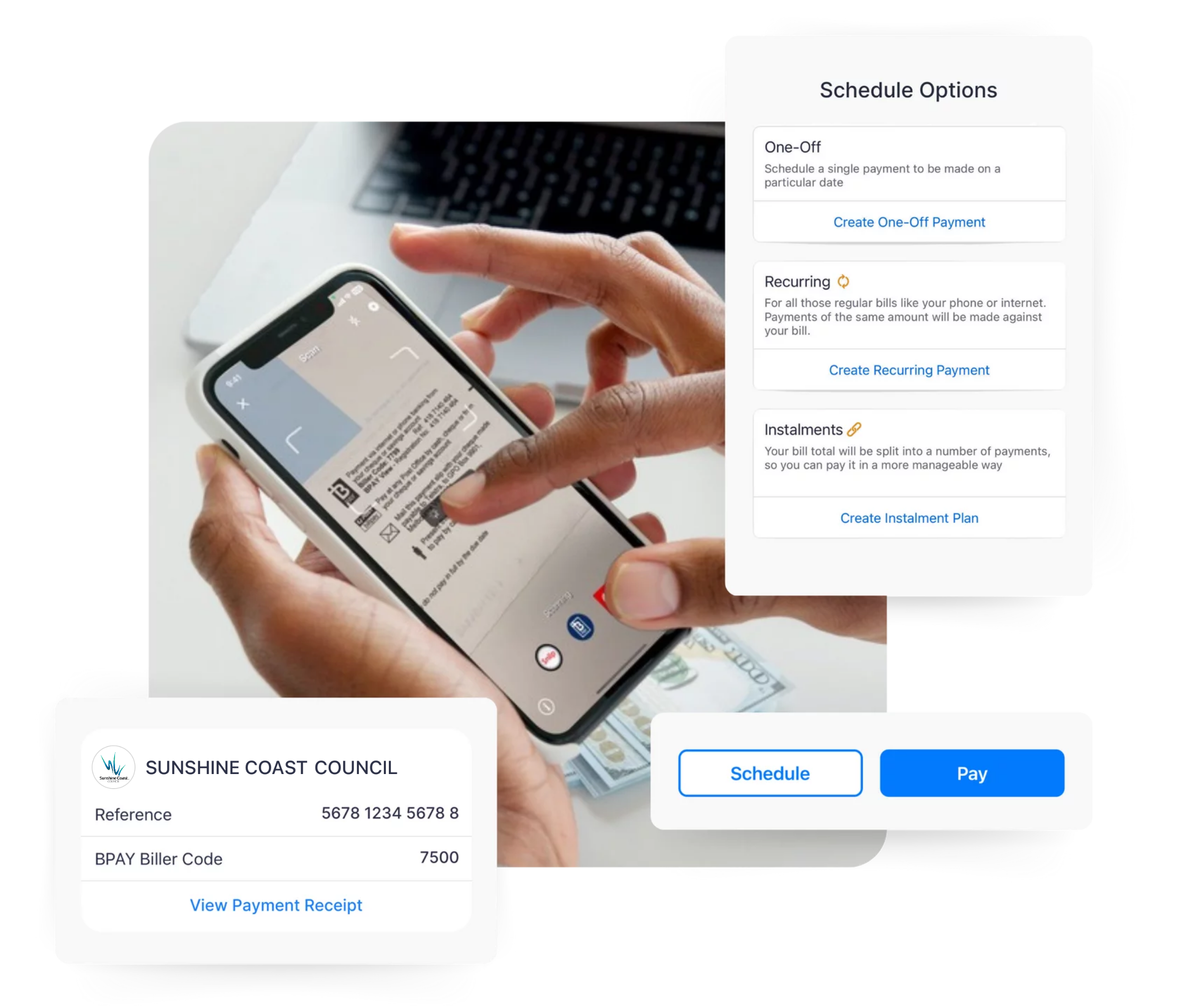
All you need is the BPAY Biller Code and Reference Number printed on your Sunshine Coast Council rates notice. Simply scan or manually enter these details into the Sniip app and you’re done – no errors, no stress.

Receive your rates notice via email? Simply share the PDF directly into the Sniip app and we’ll handle the rest. Trusted by more than 180,000 Australians – and growing every day.

alt=(Pay Sunshine Coast Council Rates With Sniip)

What is Sunshine Coast Council

Sunshine Coast Council is a local government authority serving the Sunshine Coast Region in Queensland, Australia. It provides essential services to residents including roads, parks, waste management, town planning, and community facilities — funded through quarterly rates notices issued to property owners across the region.

Sunshine Coast Council is one of the largest councils in Queensland by population. All Sunshine Coast Council rates notices include a BPAY Biller Code and Reference Number — which means you can pay them effortlessly through Sniip using any payment method you like, including credit cards and Amex.

Automatically Import Bills

Sunshine Coast Council Rates

When you receive your next email with a Sunshine Coast Council Bill, you can have it set to automatically import in the Sniip app.

Now, you can schedule or pay your bill in seconds! You’ll receive a notification from Sniip when a new bill arrives in the app.

You can set up auto-import by doing the following:

  1. Tap the menu icon in the top left corner.
  2. Select ‘Import from email’.
  3. From here, choose your email provider and enter the email address you’d like your bills imported from.
  4. Tap ‘Continue’ and follow the prompts to connect your email address.
In addition, Sniip gives you the choice of using any credit cards or payment methods to pay your bills, plus you can pay with Apple Pay or Google Pay too!
 

Paper bill: Add your paper Sunshine Coast Council bill to Sniip app

Sunshine Coast Council Rates

  1. Grab your paper bill and open/login to the Sniip app on your mobile  
  2. Then, select the ‘+’ button in the top right corner of the Sniip app   
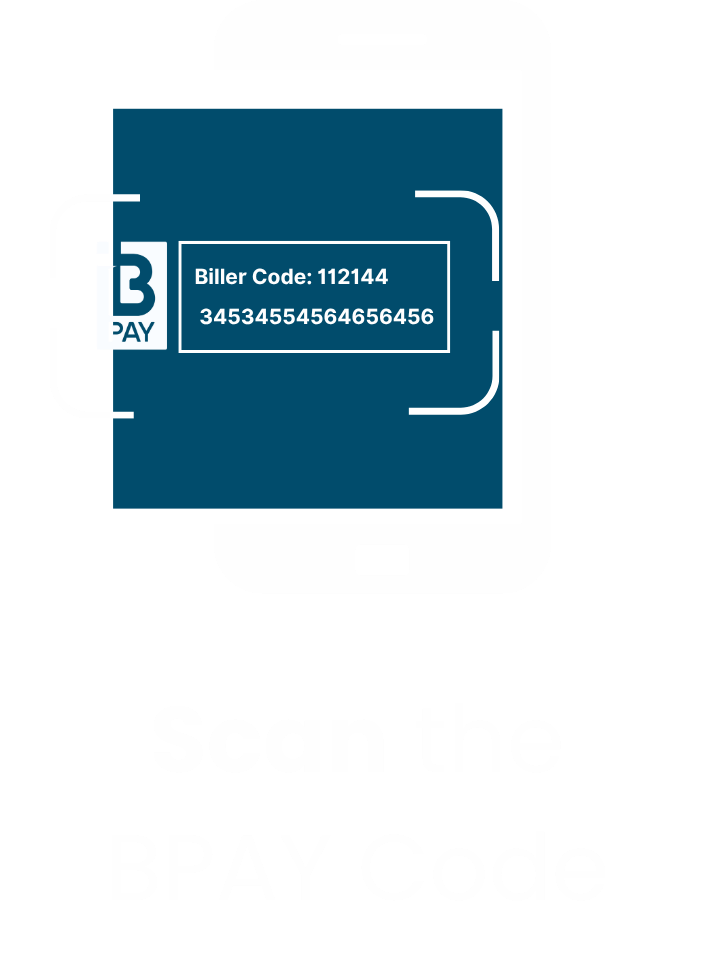
  3. Finally, tap ‘Scan any bill’ and hover your camera over the BPAY Biller Code and Reference Number on your bill (the exact same way you’d scan a QR code) 
When you scan the BPAY Biller Code on your Sunshine Coast Council bill with Sniip, you never have to question if you’re paying the right biller.
 
In addition, Sniip gives you the choice of using any credit cards or payment methods to pay your bills, plus you can pay with Apple Pay or Google Pay too!  
 

Photo of bill: Import bill from camera roll​

Sunshine Coast Council Rates

  1. Open the email received from the Sunshine Coast Council to access your bill 
  2. Then, take a screenshot of the page of the bill that displays the BPAY Code and Reference Number
  3. Lastly, open the Sniip app and import the bill screenshot from your camera roll, ready for payment (you can pay Sunshine Coast Council with any credit card or other payment method via Sniip)
Inside the Sniip app, you have the choice of any payment method for your bill. Therefore, you can pay with any card you like (incl. American Express) and earn full points on the payment. Of course, for a fee-fee option, you can pay from your bank account. 
 

How to manually add your Sunshine Coast Council bill to Sniip

Sunshine Coast Council Rates

  1. Open the Sniip app and tap on the ‘+’ icon in the top right corner
  2. Then, select ‘Add bill manually’ and enter the Sunshine Coast Council BPAY Code (18259)
  3. Finally, enter your bill details to schedule or pay the bill through Sniip (you can pay Urban Utilities with any credit card or other payment method via Sniip)
Inside the Sniip app, you have the choice of any payment method for your bill. That is, you can pay with any debit or credit card you like (incl. American Express) and earn full credit card points on the payment. Additionally, for a fee free option, you can pay from your bank account. 
 

Scan the Sniip QR Code in your Sunshine Coast Council bill

Sunshine Coast Council Rates

  1. Grab your paper bill and open/login to the Sniip app on your mobile  
  2. Then, select the ‘+’ button in the top right corner of the Sniip app   
  3. Finally, tap ‘Scan any bill’ and hover your camera over the Sniip QR Code at the bottom part of your bill.
When you scan the Sniip QR Code on your Sunshine Coast Council bill with Sniip, a screen will appear with your BPAY biller code and Reference number, then just follow the prompts for a seamless payment with your preferred payment method. 
 

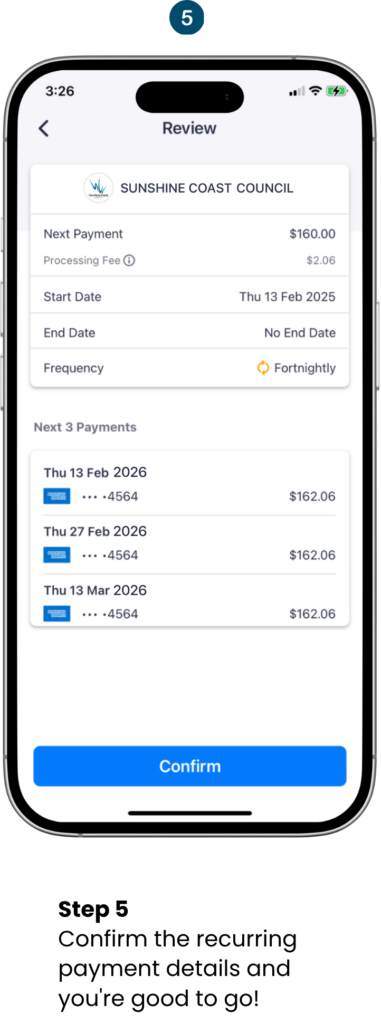
Recurring Payments/Sunshine Coast Council Rates Direct Debit

alt=(Pay Sunshine Coast Council Rates With Sniip)

Frequently asked questions

How do I contact the Sunshine Coast Council via phone call or email?

The contact number for Sunshine Coast Regional Council is (07) 5475 7272.

If your question relates to paying your Sunshine Coast Council rates with Sniip, contact (07) 3268 7710.

What’s the address of the Sunshine Coast Council?

The address of the Sunshine Coast Regional Council is 54 First Ave, Maroochydore QLD 4558. 

How do I pay Sunshine Coast Council rates?

Paying your Sunshine Coast Council rates with Sniip is easy:

  1. Download the Sniip app (available on iOS and Android)
  2. Add your rates notice using your BPAY Biller Code (18259) and Reference Number
  3. Select your preferred credit card as the payment method

Sniip accepts all major credit cards including Visa, Mastercard, and American Express. You'll earn full credit card reward points on every payment & through the app with eligible payment methods.

When will I receive my Sunshine Coast Council rates notice?

Sunshine Coast Council issues rates notices twice a year (half-yearly):

  • First notice: issued around January, covering January to June
  • Second notice: issued around July, covering July to December

Notices are typically sent approximately 30 days before the payment due date. For the exact schedule for the current period, contact Sunshine Coast Council directly at customer.service@sunshinecoast.qld.gov.au or call (07) 5475 7272.

What’s Sunshine Coast Council mapping? What area does the council cover?

Sunshine Coast Council mapping refers to the council's digital geographic platform, MyMaps, which provides residents and businesses with access to the region's spatial and geographic data. You can use it to:

  • Look up your property details and lot information
  • View council divisional boundaries and electoral boundaries
  • Access planning and development overlays
  • Check flood mapping and environmental data
  • View underground services infrastructure

Visit sunshinecoast.qld.gov.au/mymaps to access the tool.

How do I pay Sunshine Coast Council rates via BPAY? What’s the BPAY Biller Code?

To pay your Sunshine Coast Council rates via BPAY: Sniip app, scan or enter your BPAY Biller Code, select your credit card, and pay in seconds. With Sniip, you can also earn rewards on your rates payments - something standard BPAY doesn't offer.

How do I pay Sunshine Coast Council rates with an American Express or a credit card?

You can pay with your AMEX through the Sniip app.

Here's how:

  1. Download the Sniip app
  2. Add your rates notice using your BPAY Biller Code (18259) and Reference Number
  3. Select your Amex as the payment method and confirm

This means you can earn full rewards points on your AMEX and though the Sniip App. Learn more about paying your bills through Sniip with your AMEX Card.

How do I find the Sunshine Coast Council divisions map?

You can view the Sunshine Coast Council divisional boundaries map in two ways:

  • Online: Visit sunshinecoast.qld.gov.au/mymaps and toggle on the Council Divisions layer
  • PDF download: A regional boundary map (PDF) is available directly from the MyMaps page on the council website

The Sunshine Coast is divided into 12 council divisions, each represented by an elected councillor. The divisional map is useful for identifying your local councillor and understanding which electoral area your property falls within.

I want to make a Sunshine Coast Council rates payment, how?

Easy! Enter your bill to the Sniip App (Add Manually, Scan BPAY code, import from email) - and use your favourite payment method to pay your bill!

Sunshine Coast Council rates login?

To view and manage your Sunshine Coast Council rates online, visit mycouncil.sunshinecoast.qld.gov.au and register or log in to your MyCouncil account. From there you can:

  • View current and past rates notices
  • Set up or manage a direct debit
  • Switch to email delivery of your rates notices
  • Update your contact details

When is my Sunshine Coast Council rates notice due?

Payment is due approximately 30 days after your rates notice is issued. Based on the standard billing cycle:

  • First half (January–June): Due around late February
  • Second half (July–December): Due around late August

The exact due date is printed on the front of your rates notice.

How do I make a Sunshine Coast Council payment plan?

Do I get a pensioner or seniors discount living in Sunshine Coast Council?

Yes! Eligible pensioners may receive rate concessions. If you hold a Pensioner Concession Card or a Veteran Affairs Gold Card and you own and live in a property within the Sunshine Coast Council area, you may be eligible for:

  • State Pensioner Rate Subsidy (set by the Queensland Government)
  • Council's Pensioner Rate Concession

Contact Sunshine Coast Council's Customer Service Centre on (07) 5475 7272 or visit their website for eligibility details and how to apply.

Can I still use Sniip without the QR code?

Yes - simply use the BPAY import bill function in the app.

Scan BPAY Code (as you did QR code)

OPTION 1: Scan the BPAY Biller Code the exact same way you scanned the QR code.
A digital copy of your bill will be imported into the app along with the BPAY Biller Code and Reference from your bill. 

OPTION 2: Tap the blue ‘+’ button in the top right corner of the app and select, ‘Add bill manually’, search BPAY Biller Code 18259 and add the Reference as it appears on your bill. 

Is it as fast to pay via BPAY with Sniip as it was with the QR code?

 Yes - and even faster once your biller is saved.

Can I earn rewards paying my Sunshine Coast Council rates?

You can now using Sniip! Moving from the QR code to the BPAY Biller Code enables you to earn Qantas Points on your payments with Sniip. 

Simply add your Qantas Frequent Flyer into the Sniip app under ‘Loyalty’ in the side menu. You’ll earn 1 Qantas Points per $10 (up to 2,000 points each month) on your eligible payments.

Is it secure to pay my Sunshine Coast Council rates with Sniip?

Sniip uses bank-level security to protect your payments and is PCI DSS Tier 1 (the same grade as banks). 

Sniip is an Australian-owned, Brisbane-based company with almost 200,000 registered users.

Discover Sniip

Sniip ranked in the AFR Fast 100 for 2025

Sniip ranked in the AFR Fast 100 for 2025 We’re proud to share that Sniip has been recognised in ...
Sniip ranked in the AFR Fast 100 for 2025

Sniip ranked in the AFR Fast 100 for 2025 Sniip’s Ranks in AFR Fast 100, Cementing Its Status as One ...

10 Unexpected Bills You Can Pay With Sniip 2025

Wrap Up Your Payments: 10 Surprising Bills You Can Pay with Sniip It’s that time of year again! ...

Christmas Gifting List 2025

Christmas Gifting List It’s that time of the year, and at Sniip, we love it! We are always ...

specifically in fact
still in general
straightaway in light of
subsequently in like fashion
surely in like manner
surprisingly in order that
than in order to
then in other words
thereafter in particular
therefore in reality
thereupon in short
thirdly in similar fashion
though in spite of
thus in sum
till in summary
undeniably in that case
undoubtedly in the event that
unless in the final analysis
unlike in the first place
unquestionably in the fourth place
until in the hope that

but, because, so also, and, also also also, because, so also, because