Fast Five

Fast Five: Our most commonly asked questions this week (14/02/2022)
Our most frequently asked questions in February 2022

1. Are my Sniip Rewards automatically applied to my bill? I can’t see how to redeem them? 

When it comes to using your Sniip Rewards on your bills, you’re in control of when and how you use your rewards.

To use your reward credit, turn on the ‘Use Sniip Rewards’ toggle slider on the pay screen. 

You can watch how to turn on your reward toggle, here or learn more about rewards, here.

2. Will I be charged the processing fee by Sniip and by my biller?

Short answer, no. You are never charged twice. 

When you pay a bill with a BPAY Biller Code, you pay only the Sniip processing fee associated with your payment method. 

When you pay using a Sniip QR code (on selected rates and water bills), there is no Sniip processing fee. You may be charged a fee by your biller at the time of making the payment, or on your next bill, for payment processing costs.

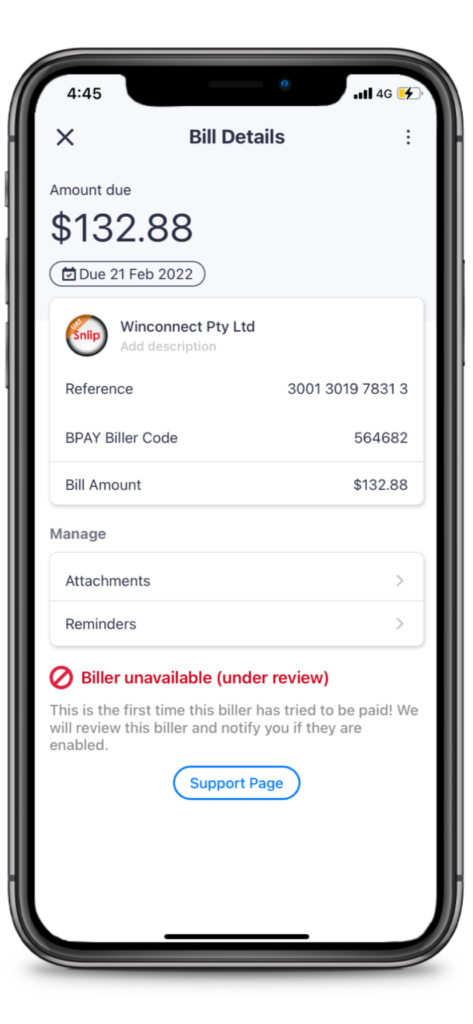
3. Why is my biller currently under review? How can I speed up the process?

Great question! If your bill is under review, it’s likely that you’re the first person to pay that biller with the Sniip app. 

Rest assured, we review new billers as quickly as possible – usually within 24 hours. 

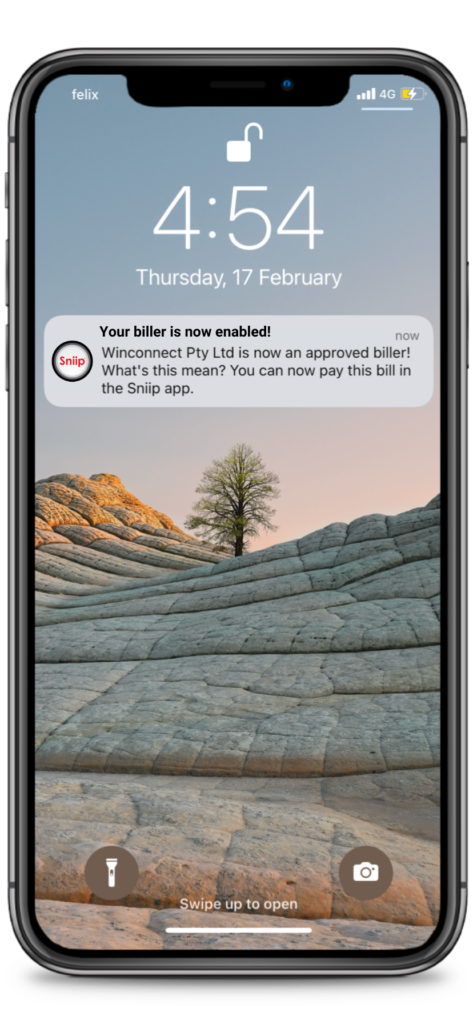
If your biller is approved, you will receive a push notification letting you know. You may be asked to supply a copy of your invoice as part of the approval process. 

If your biller is determined to fall under one of our restricted industries, Sniip will display the message ‘Biller not currently available’ on the ‘Bill Details’ screen. If there’s any urgency to your bill payment, we completely understand! Please email a copy of your bill to customercare@sniip.com. Alternatively, call our Sniip Support Squad on (07) 3268 7710 and we’ll be happy to assist you.
4. I’m paying bills with my Crypto.com card. What’s it classified as? Will I earn points?

This is a hot question! Crypto.com cards are classified as prepaid debit cards and earn full points with Crypto.com. 

Sniip does not determine the classification of the Crypto.com card. When the card is validated, the payment gateway returns a notification that the card is classified as a prepaid card.

The Crypto.com website states: “The Crypto.com Visa Card is a prepaid card. Broadly speaking, prepaid cards are the same as debit cards. The difference is that debit cards are linked to your bank account, but prepaid cards need to be topped up. In our case, you can top up using bank account transfers, other credit/debit cards, or cryptocurrency.”

5. If my bill doesn’t have a QR code on it, how do I pay it with Sniip?

If your bill is one of the 60,000+ bills with a BPAY Biller Code on it, chances are you can pay it with Sniip! 

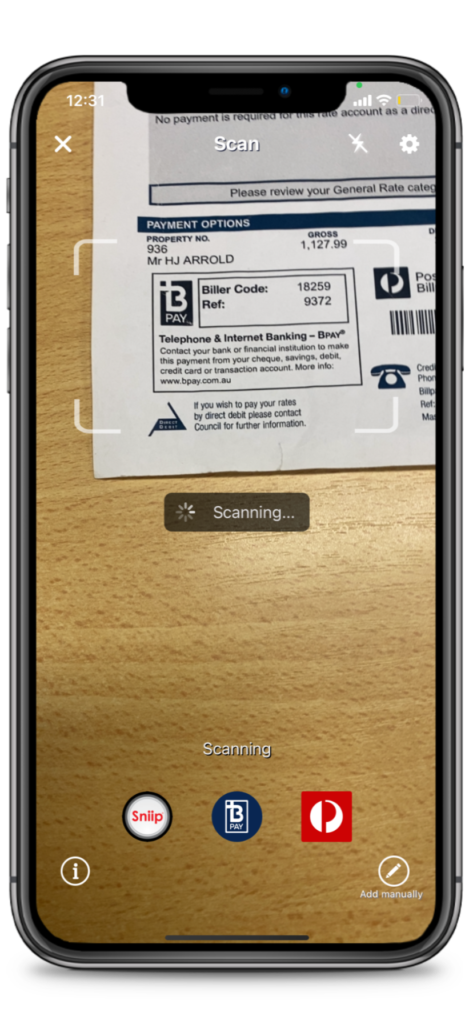
It’s the same process as scanning a Sniip QR code. You simply open the Sniip app, tap the ‘+’ button, select ‘Scan’, then hover your phone over the BPAY Biller Code on your bill. 

The app will then pull your bill into the Sniip app ready for you to review and pay!
Fast Five: Our most commonly asked questions this week October 2021

Our most frequently asked questions in October 2023

1. How long will it take for Refer a Friend Rewards to be applied to my account?

Great question! When you refer a friend and they pay their first bill, your $10 reward credit will be applied to your account immediately. 

If your friend hasn’t paid a bill, you will see ‘Pending rewards’. These credits will not be applied to your account until your friend pays their bill. 

We recommend telling your friends about all the features you love about Sniip and encouraging them to pay their first bill! 

2. How do I know if my payment has been confirmed? Where are my receipts?

If you are unsure whether your payment was successful, you can review your receipts under the ‘History’ tab in the Sniip app. 

All your successful payments will be stored here with a timestamp of when the funds were successfully paid into your biller’s account. 

The ‘History’ tab can be accessed from your homepage in the app along the bottom menu. 

Hot tip: You can email yourself a copy of your receipt from the Sniip app. Just tap the envelope in the top right hand corner of your receipt! 

3. Do I need to verify myself in the Sniip app?

Unless you have been contacted by one of our Sniip Support Squad, or received a notification in the Sniip app requesting verification, you do not need to verify yourself in the Sniip app. 

We love that many of you are voluntarily verifying yourself in the Sniip app and you are more than welcome to do so. 

You can view your verification status under your ‘Account’ in the Sniip app. If we require verification from you, next to ‘Verify Account’ you will see ‘Required’. If it’s blank, you’re all good to keep paying those bills!

If you are asked to verify your account, it’s no worries! You will be notified when your verification has been approved. A little green tick will appear next to your initials or profile photo at the top of the home screen in the Sniip app – yay! 

4. Do I need to use my legal name in the Sniip app or can I use a nickname?

This is a great question! For your security and that of all Sniip users ,we need you to enter your legal name in the Sniip app. Customer protection, card security and fraud prevention are the highest priority at Sniip. 

Unfortunately at this point, we cannot accept nicknames. However, we are working with our tech team to allow our users to have a legal name and a preferred name (nickname) as part of their Sniip profile.

5. How do I invest in Sniip?

This is one of the most commonly asked questions on Google!

Right now we’re an unlisted public company, so we do not publish a share price.

If you would like to find out more about investing in Sniip, we’ve just created a new email investors@sniip.com. Pop us an email through here and one of the Sniip Corporate Finance team will get in touch.

Fast Five: Our most commonly asked questions this week July 2021

Our most frequently asked questions in July 2021

1. How will I know when the payment is received by the biller? 

The bill is paid to your biller via BPAY the same day we receive the funds (generally the next business day). 

The biller has to recognise the date of payment being the day it was paid via BPAY. 

This is shown on the confirm screen before you submit the payment and you can also see this in the History section of your Sniip app.

2. I pay my rent via BSB and account number. Can your app be used to pay that or is it BPAY only?

Unfortunately we currently don’t offer payments to BSB and account numbers. We’re currently working on a solution and we’ll keep you posted! 

3. How many points can I earn by paying ATO with my credit card? Would paying via Sniip offer a higher reward point earning?

We’re pleased to confirm you earn your full amount of loyalty points when paying with Sniip, irrespective of the card. 

4. Why can’t I pay DEFT with my AMEX via Sniip?

We are currently working on this with AMEX. It’s a regulatory issue and we believe it can be overcome.

There are lots of customers who want to pay DEFT bills and we are just as keen to allow them. 

We’ll  keep you posted on our progress but hopefully not far away now!

5. With the $10 referral offer that I received. Does it expire? I don’t have to pay bills for a little while and want to make sure I don’t miss out.

Currently we don’t have an expiration date on referral codes, but we are planning to add one in the next few months. But you will be good for at least a few months.

Fast Five: Our most commonly asked questions this week May 2021

1. Can I pay with my credit card without using Apple Pay?

You sure can! You can manually add or scan your credit/debit cards. To do this, select the “Wallet” tab at the bottom of the Sniip app, then select the small “+” icon in the top right corner of the screen. You can then add your card details.

When making a bill payment, Apple Pay is the default payment method. To select an alternate payment method, simply swipe right on the Apple Pay logo to select your preferred option.

2. Why was my Amex card charged $1 before paying a bill?

When you add a credit card to the Sniip app, we make a $1 authorisation charge to the card. This dollar will be refunded back to you as soon as possible. 

3. Will I earn points when using other credit cards that are not Amex?

Great question! You are still eligible to gain points using any credit card attached to a loyalty program. When using one of these cards, you will gain full points when using the Sniip app to pay your bills. 

4. Can I make partial payments to billers that only accept full payments?

In the Sniip app, we allow users to set-up instalment plans (using their own money) to pay off their bills. Unfortunately, certain billers require you to pay the full amount in one transaction. Examples of payments that cannot be paid in installments include, car registration, fines and licence renewal fees.

5. Why can’t I make a payment to another credit card or debt facility using a different credit card?

Unfortunately, there are restrictions in place for payments to certain billers using credit cards, as determined by BPAY and our banking partners. This includes not being able to pay credit facilities with a credit card.  If you wish to use a debit card to pay this biller, Sniip may be able to facilitate this transaction, depending on the bill you are paying.

Do you have any questions about Sniip? Call us at (07) 3268 7710 or email at customercare@sniip.com

Fast Five: Our most commonly asked questions (24/05/2021)

Our most frequently asked questions in May 2021

1. Can I pay with my credit card without using Apple Pay?

You sure can! You can manually add or scan your credit/debit cards. To do this, select the “Wallet” tab at the bottom of the Sniip app, then select the small “+” icon in the top right corner of the screen. You can then add your card details.

When making a bill payment, Apple Pay is the default payment method. To select an alternate payment method, simply swipe right on the Apple Pay logo to select your preferred option.

2. Why was my Amex card charged $1 before paying a bill?

When you add a credit card to the Sniip app, we make a $1 authorisation charge to the card. This dollar will be refunded back to you as soon as possible. 

3. Will I earn points when using other credit cards that are not Amex?

Great question! You are still eligible to gain points using any credit card attached to a loyalty program. When using one of these cards, you will gain full points when using the Sniip app to pay your bills. 

4. Can I make partial payments to billers that only accept full payments?

In the Sniip app, we allow users to set-up instalment plans (using their own money) to pay off their bills. Unfortunately, certain billers require you to pay the full amount in one transaction. Examples of payments that cannot be paid in installments include, car registration, fines and licence renewal fees.

5. Why can’t I make a payment to another credit card or debt facility using a different credit card?

Unfortunately, there are restrictions in place for payments to certain billers using credit cards, as determined by BPAY and our banking partners. This includes not being able to pay credit facilities with a credit card.  If you wish to use a debit card to pay this biller, Sniip may be able to facilitate this transaction, depending on the bill you are paying.. 

Do you have any questions about Sniip? Call us at (07) 3268 7710 or email at customercare@sniip.com

Fast Five: Our most commonly asked questions this week February 2021

Our most frequently asked questions in February 2021

1. When is my bill paid?

We pay your bill as soon as we receive your funds. Generally speaking, we receive your funds the next business day.  

For example, if you pay your bill via Sniip on a Tuesday, we’ll receive your funds on Wednesday and your bill will be paid on the same day. 

If you use a Visa or Mastercard and pay by midnight AEDT, we’ll receive your funds the next business day. Your bill payment is made the same day that we receive the funds via BPAY.

Please note: If you pay on a Friday, we won’t receive the funds until Monday. That’s why it’s important to add your due dates to the app and we’ll automatically schedule when your bill is paid, so that you meet your due date.

2. Do you pay my bill in full four instalment plans and then I pay Sniip back?

Great question! With Sniip instalments, we pay your bill off in instalments to the biller as we receive the money from you. We don’t hold any funds in the Sniip app, nor do we provide credit.    

Most billers are okay with receiving your bill in instalments as long as they’ve received all the funds by the due date. We calculate this for you as part of your instalment plan. 

Sniip instalment plans are not currently a buy now, pay later offering (but watch this space). 

You can find out more about setting up an instalment plan, here.

3. Your app was recommended by Amex with a rate of 1.5%. What’s the benefit of using Sniip for Amex transactions?

Great question! With Sniip instalments, we pay your bill off in instalments to the biller as we receive the money from you. We don’t hold any funds in the Sniip app, nor do we provide credit.    

Most billers are okay with receiving your bill in instalments as long as they’ve received all the funds by the due date. We calculate this for you as part of your instalment plan. 

Sniip instalment plans are not currently a buy now, pay later offering (but watch this space). 

You can find out more about setting up an instalment plan, here.

4. Is there any other way to pay a bill than scanning the BPAY Biller Code and Reference Number.

Absolutely! Firstly, you can enter the BPAY Biller Code and Reference numbers manually. 

Alternatively, you can ‘share’ or import the bill attachment to the Sniip app from your email. 

Or, our favourite option: If you have a Gmail or Microsoft account, you can sign up for auto bill import and have your bills automatically sent to the Sniip app for payment. 

5. What are your processing fees?

The processing fee for Amex, Visa and Mastercard is 1.5%. International cards attract a 3% processing fee. 

Plus, there’s a free option. You can use a debit card for free in the Sniip app. 

That covers all the processing fees in the Sniip app. 

Any other fees noted are from your biller. When you scan the BPAY Biller Code on your bill, all the rates are the same. 

If you’re scanning a Sniip QR code, the surcharges are defined by the billers and should be the same as paying through their website. 

These processing fees include GST which you can claim back at tax time as a GST registered business.